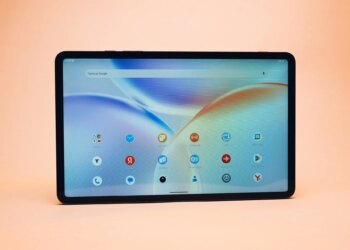
Huawei introduced quite a few devices during the Mobile World Congress (MWC) 2022 in Barcelona. One of those devices was the Huawei MateBook E, the device we’re talking about here. The Huawei MateBook E managed to peak my attention during the tradeshow, as it is a Windows 11 tablet that transforms into a laptop seamlessly. How? Well, thanks to the Huawei Smart Magnetic Keyboard, which we’ll talk about below.
So, you not only get a full-fledged tablet, with full Windows 11, but also a laptop when you need it. That kind of versatility is what many people would appreciate. Many would agree that Android tablets cannot replace full-fledged PCs (including laptops), well, this may be a solution for you. Best of all, the MateBook E is also considerably more affordable than the MateBook X Pro laptop that the company announced. Is it worth it, though? Well, that’s what we’re here to find out, in the Huawei MateBook E review.
Great design & build quality
 Advertisement
The Huawei MateBook E does look really nice. This is a 12.6-inch tablet that is really thin, at around 7mm. It’s not too large to handle as a tablet, though you do get a large display here. The bezels are quite thin as well, while there is no camera hole, notch or anything of the sort. The frame of this tablet is made out of metal, while we’re not sure about the back, but it does feel like paper. It could be glass, with a paper-like overlay on top, though, we’re not entirely sure. It does feel nice, though, has some texture to it. The downside is, it’s not all that grippy, and it’s a grease magnet.
It includes a fingerprint scanner

The tablet has three pogo pins at the bottom (landscape view), which you can use to attach it to the Huawei Smart Magnetic Keyboard. As the name says the tablet magnetizes to that keyboard, thanks to its metal frame. If we look at it from the landscape point of view (leaned to the left), the volume rocker buttons are on the top, while the power / lock key is on the left. That power/lock button ends up being on the top if you hold it in portrait mode, and it doubles as a fingerprint scanner. It works fairly well, by the way.
Advertisement
It’s not too heavy considering the size and what it packs inside
Huawei’s hybrid tablet weighs 709 grams, which is actually not that heavy for a 12.6-inch tablet. Do note that 709 grams is 709 grams, though, and this is not a one-hand device in any way, shape or form. Not only that it’s too large and heavy for one-handed use, but it’s also quite slippery. You can hold it in one hand, though, when needed, just make sure to grip it properly. There is no 3.5mm headphone jack on its body, in case you were wondering. The device does feel really sturdy and high quality, though.
The Huawei Smart Magnetic Keyboard is included, and it’s immensely useful

The Huawei Smart Magnetic Keyboard is included in the package. When you get the MateBook E, Huawei will ship one your way. Some of you probably didn’t expect that, but there you go. This is a must-have accessory for this tablet, so it’s not surprising at all. It essentially provides both a case, and a physical keyboard (+touchpad) for the tablet, turning it into a Windows 11 laptop, basically.
Advertisement
I prefer the Smart Magnetic Keyboard for the MatePads
Is it any good, though? Well, truth be said, I preferred the one for Huawei’s tablets. Those magnetic keyboards not only didn’t include pogo pins, but they had a more grippy layer on them. This magnetic keyboard is quite slippery on the outside, and it collects grease like nobody’s business. That was not the case with the Huawei Smart Magnetic Keyboard for the MatePad Pro, and earlier tablet devices from the company. I’m not sure why Huawei went this way.
The touchpad is… well, not good

The keyboard itself is really good, though. It’s a joy to type on, as keys have enough travel. These are chicklet-type keys, like the ones you’d get on a tablet, and I actually wrote a part of this review using them. I enjoy good chicklet keyboards, and even if you don’t take into account this is just an accessory, it’s really good. The touchpad is not on the same level, though. It’s good, but not great. It’s not on the same level as touchpads on laptops, but it’s good nonetheless. You’ll notice a difference if you’ve been using a touchpad on a high-end laptop, though.
Advertisement
The Huawei M-Pencil is not included

The Huawei MateBook E does support the company’s stylus, the M-Pencil. Do note that you won’t get this stylus in the package, though, you’ll have to buy it separately if you want to use it. The stylus itself is not too small at all, it’s the size of a proper pen. It has 4,096 levels of pressure sensitivity, and a 2-millisecond latency. You can basically use it for 10 hours straight before it runs out of juice. Charging it is really easy, as you simply have to magnetize it to the tablet, which is also how you pair it. This stylus is definitely recommended for graphic designers, as it will give you that extra edge. I didn’t find myself using it all that much, to be quite honest, other than testing and signing some documents.


The display bright, vivid, and touch response is good
The Huawei MateBook E features a 12.6-inch QHD (2560 x 1600) display. This display does support the P3 color gamut, and gets up to 600 nits of peak brightness. Do note that you’ll be able to get a max of 400 nits if you’re using manual brightness. As some of you already noticed by the resolution alone, we’re looking at a 16:10 aspect ratio here. This is an OLED display, a 60Hz one, and a screen-to-body ratio is 90-percent.
Advertisement
There is an anti-fingerprint layer on top of this display, and the panel can register up to 10 touch points at the same time. The viewing angles are really good, and the display itself seems to be a fairly quality panel. It’s more than bright on most occasions, though if you’re in direct sunlight or something of the sort, you may have issues. That is the situation with the vast majority of laptops and tablets out there, though.
The colors are vivid, and Huawei is trying to keep them true-to-life here at the same time. In all honesty, I enjoyed using this panel. It’s very good, and the touch response is great as well. I found myself using it more like a tablet, even though Windows 11 is not the most touch-friendly OS. Still, whenever I needed to type something, I reached for the keyboard.
Advertisement
The performance is great, but Windows 11 is an obstacle at times
The Huawei MateBook E comes in several different builds. It comes with the Intel Core i3-1110G4, i5-1130G7, or i7-1160G7 processors. The model we reviewed includes the Core i5 variant. In addition to that, you can get 8GB or 16GB of LPDDR4X RAM, in our case, that’s the 16GB RAM model. You can also choose between 128GB, 256GB, and 512GB of storage, though not all models are available in all variants. You can visit the company’s website to find out more.
It’s more than powerful enough
That being said, all of this is backed by Windows 11. The sheer performance of the device is really good. Now, do note that this is LPDDR4X RAM, not your regular computer RAM you’d find in a high-end laptop or something like that. That won’t really make a difference to the vast majority of you (unless you plan on doing something truly RAM-hungry), but it is worth noting. Even despite that, that’s plenty of RAM power, on top of the 11th-gen ‘Core i’ series chip. Just to be clear, that is basically the same chip that Huawei includes in the MateBook X Pro, so… it packs a punch. Just note that this is not a gaming machine, not at all.
Windows 11 is not exactly the most touch(screen)-friendly OS out there
 Advertisement
With my workload, I didn’t have any issues with the device whatsoever, well, when it comes to performance. What I did find an issue with is Windows 11. In laptop form, it works great, but Windows 11 is not the most touch-friendly OS out there. Don’t expect to get the same experience as you’d get with Android or iOS. Even some simple tasks such as moving icons across the screen can be finicky, unfortunately. That’s Windows 11’s fault, not the fault of this tablet, that’s for sure. The same problem occurs on other touch-enabled devices with Windows 11. If you plan on using it with the Magnetic Keyboard most of the time, you’ll be good to go.
The Super Device factor
Huawei presented something called ‘Super Device’ at MWC 2022. That is essentially a new platform for connectivity between Huawei devices. You can easily connect the MateBook E, to your Huawei smartphone, for example. The same goes for other devices. Once you connect them, you can seamlessly share capabilities from one device to the next. For example, you can start sketching something on the MateBook E, and continue doing so on the MateStation X. All in all, this works really well, though I’ve only tested it between this device, and a smartphone. It can be quite useful. You can also use multi-screen collaboration with Huawei smartphones, if you need more than one screen for something. All that works really well.
Mediocre battery life, impressive fast charging
The MateBook E includes a 42Wh battery on the inside. When it comes to battery life, well, don’t expect great numbers here. I’ve been able to get around 4-4.5 hours of screen-on-time before I had to charge this thing. Do note that I didn’t push it too hard, I used it mainly for the browser, with some photo editing, and a quick video edit thrown into the mix. I used it mainly as a media consumption device, as it definitely feels like that’s what it’s made for. Do note that I used it with high brightness most of the time, though.
You can get over 50% of battery charge in only 30 minutes
The device does support fast charging, of course. It comes with a 65W charger, and that equals its supported charging. You can get it from 0 to 54-percent in only 30 minutes, while it will take you about an hour and a half for a full charge. Those are Huawei’s numbers, and we’ve landed on similar numbers while testing. Those are not great numbers, true, in comparison with regular tablets. Still, this is an extremely portable and versatile device, and not a replacement for your workhorse laptop.
The pictures are good… considering this is a tablet
When it comes to cameras, well, you may be surprised. These cameras cannot compete with high-end smartphone cameras, not even close, but they’re better than what you’d find on most tablets. Even the front-facing camera is better than you’d find on most laptops, in terms of performance.

Once again, don’t expect great results here, and you should not use this instead of your high-end smartphone camera. These cameras will do great for a casual photo or video, plus the front-facing camera is really good for video calls. I’ve noticed a bug with video orientation while using Google Meet, though. The video was in portrait mode regardless of what I did, so… I guess that’s something that needs to be fixed. I’m not sure if it’s on Huawei’s end or Google Meet’s, but there you go.
Four speakers are included, and the audio quality is great

The audio performance on the device is really, really good. Huawei managed to cram four speakers inside of this thing, four side-firing speakers. That being said, the sound is rich, loud, and you won’t notice any distortion. The sound output is also well-balanced across lows, mids, and highs.
There are also four microphones provided here
In addition to four speakers, Huawei also decided to include four microphones. Those do come in quite handy for video calls, and videos, if you plan on filming some with this tablet. I received positive opinions regarding audio quality from my side during meetings. All in all, the Huawei MateBook E is well-covered in the audio department. And yes, there is a 3.5mm headphone jack here as well.
The Huawei MateBook E is a good choice if you want a versatile Windows 11 tablet

So, is the Huawei MateBook E worth the asking price? Well, if you’re not looking to replace your extremely powerful laptop, then yes, it certainly is. The MateBook E has a lot of positives. It’s very slim, looks great, has a good display, really good performance, and excellent sound. You can even use these cameras and not be shocked at how bad they are, which is a rarity for devices of this type. The included magnetic keyboard/case is an excellent addition too, though the touchpad is not great. The battery life, on the other hand, is not great. That is something you should definitely note if you’re planning to get this. If you plan on using it as a multimedia consumption device, this device will likely serve you well for years to come. It’s up to you, but there’s a reason why it costs considerably less than ultrabooks, it’s in a category of its own, and that’s a good thing.